

Mo State’s Bear Shield app is free to download and use. It offers tools for emergencies as well as everyday safety needs.
We recently chatted with Robert Rowley, director of university safety, about some of Bear Shield’s features and how faculty can help students learn about this resource.
How to Use Bear Shield
To Request Emergency Assistance
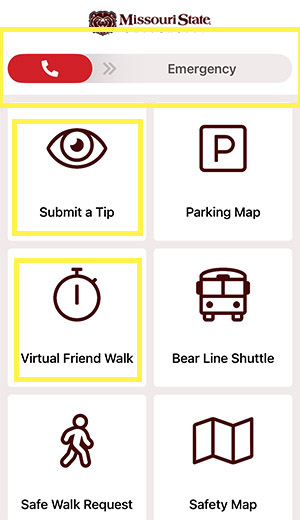
Once you’ve downloaded Bear Shield and entered your contact information, you’ll access an interface with various safety-related functions. At the top of the screen, you’ll find the emergency slider. This works a lot like a panic button or the emergency activator on a smartphone. If you accidentally hit it, you have a few seconds to cancel. Assuming there’s no cancellation, university safety personnel receive immediate notification.
“So if you’re in a situation where you can’t talk freely or do anything more than activate that slider, you’ve done enough to get help,” Rowley says. “When we receive an emergency notification, we’re automatically given the name of the person who’s reporting it and their location — down to the room number and floor.”
To Relay Routine Information
Rowley says some of his team’s most common calls have nothing to do with emergencies — they’re about parking.
“It’s understandable,” he says. “If you’re a student who’s paid for a parking pass, and you have trouble finding a space where you want to park because there are cars parked without passes, you want to report it to someone.”
Now, people can send such reports directly through Bear Shield, using the “Submit a Tip” function. This also works for reporting an abandoned backpack or a found item that might be of vital importance to its owner, like an epinephrine pen.
Unlike emergency requests, “Submit a Tip” requests don’t automatically share the tipster’s location, but you’ll have the option of sharing that information when you submit your report.
To Set Up a Virtual Friend Walk
“Sometimes, people feel nervous about walking to their car, especially at night,” Rowley says. “But they don’t necessarily want someone from university safety to escort them.”
With Bear Shield’s “Virtual Friend Walk” function, you can let another Bear Shield app user know you’re walking. If you don’t indicate you’ve arrived within your specified time frame, your friend is alerted to follow up.
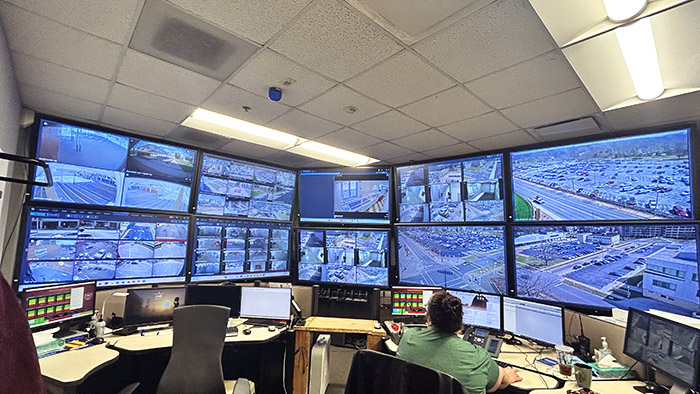
Or, Mo State’s dispatch team can act as your virtual friend. The dispatch team is on duty 24/7, constantly monitoring the university’s extensive network of cameras. If you want them to act as your virtual friend while you walk to your destination, just fill out a request within Bear Shield’s “Virtual Friend Walk” function.
And if you want an actual escort from university safety, that option’s available in Bear Shield, too. Just use the “Safe Walk Request” function.
How Faculty Can Help
Faculty are encouraged to use Bear Shield, and they can also help make students aware of it. Consider mentioning this resource to your students. You might even consider giving students a few minutes in class to download and set up the app, and you might add information about Bear Shield to your syllabi.
“We know that faculty are a top point-of-contact for students,” Rowley says. “Anything they can do to help empower students to take advantage of these resources is very appreciated.”
Discover more from Academic Expressions
Subscribe to get the latest posts sent to your email.