
Floating and clearing content are powerful CSS techniques. Unfortunately neither one is well understood. Hopefully this will clear up some misconceptions.
Common Float Mistakes
-
Misuse of float: right;

Incorrect float:right usage. I frequently see 2 column layouts where the first column is floated left and the 2nd column is floated right. Instead, both columns should be floated left or the second column should not be floated at all. Float right is reserved for when you want to shift an element (like an image) to the right side and have all the following content wrap around it.
-
Floating Everything

Non floated container with only floated elements When a non-floated container has only floated elements within it, it will not automatically expand. One “fix” for this is simply to float the container. This should be avoided as it can quite possibly just pass the problem up to the next container.
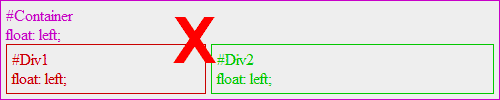
Don't float everything Instead of floating the container, either don’t float the second div or properly clear the float.
Two column layout without setting widths or floating the second column
We frequently have layouts where one item needs to be floated. In the past, we have floated both columns which in turn has required us to set a width on both columns. As soon as we try to set the same code in a different size container, we have to override all of the styles. Typically, the first column has a set width and the second column should take the remainder of the width. You can accomplish this by setting the left margin of the second column.
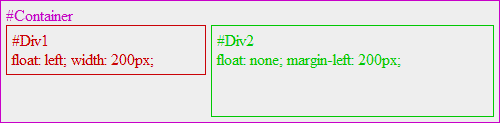
This technique does not work in Internet Explorer 6 without additional styles. Also, you will still need to properly clear the float after the second column.
Properly clearing floats without structural markup
Much of the time we use an empty div to clear a float. However, not only is that adding markup to our sites that is only used for presentation, but sometimes it’s not possible. Consider a definition list where you have floated the term and need to properly clear that float after the definition. You cannot use extra markup as it isn’t allowed. The following code snippet will properly clear a float without extra markup.
/* slightly enhanced, universal clearfix hack */
.clearfix:after {
visibility: hidden;
display: block;
font-size: 0;
content: " ";
clear: both;
height: 0;
}
More about this technique can be found at http://perishablepress.com/press/2008/02/05/lessons-learned-concerning-the-clearfix-css-hack/
Discover more from Web Strategy and Development News
Subscribe to get the latest posts sent to your email.