

Professional development doesn’t have to mean adding another major, costly commitment to your already busy schedule. As an ACUE-partnered institution, Missouri State University faculty already have on-demand access to a collection of free professional development courses covering some of the most pressing topics in higher education today through an online development platform known as the ACUE Commons. This step-by-step guide shows you how to log into the Commons and locate Quick Studies so you can get started developing your skills on your schedule today.
ACUE, or the Association of College and University Educators, is a national leader in higher education that focuses on the implementation of evidence-based teaching practices proven to transform learning experiences for students and faculty alike. ACUE provides teaching effectiveness certifications and professional development courses to higher education faculty members looking for information and support in the topics that are most pressing in their workplaces today. From AI and media literacy to student well-being and career readiness, ACUE’s engaging learning experiences provide valuable information and resources to help educators create environments that foster the skills students need to succeed in and outside of the classroom. As an ACUE partner, Missouri State University provides free access to ACUE’s learning platform, the ACUE Commons. This step-by-step guide will help you get logged in to the community and access ACUE’s Quick Studies and Endorsements so you can get started on your development today.
Logging Into the ACUE Commons
The first step in accessing free ACUE content is signing into the ACUE Commons. Follow these steps to log into your account and access the community courses, resources, and educational opportunities.
1) Find the ACUE Commons Login
First, access ACUE’s homepage and locate the top navigation bar. Here’s you’ll see a “Login” tab on the far right of the bar. Hover over the bar until a drop down menu appears, and select “ACUE Commons” from that drop-down menu.
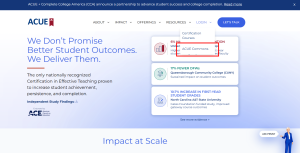
2) Log In or Set Up Your Account
You will be taken to a login screen shown below. You do not need to create an account to access the Commons; all MSU faculty who are teaching at least one course have an account automatically created for them. Enter your MSU email into the email address field (this is the email that your account has been automatically created under). If you have logged into the ACUE Commons before, enter your password and click “Log In.”

If this is your first time logging into the Commons or you can’t remember the password you’ve previously set up, hit “Reset password” underneath the password box. You will be taken to a screen that prompts you to enter the email address associated with your account. Enter your MSU associated email, and ACUE will notify you that an email was sent to this address to reset your password.

The email you receive to reset your password will contain a link that asks you to confirm the request.

Hit confirm, and you will be taken to the password reset screen. Here, you can set up your new personal password for your account.

After creating your new password, hit “Reset password.” Return to the ACUE login homepage and enter your MSU email and new password to log in to the Commons.
Note: MSU has no control over ACUE enrollment, and no access to login information or processes. If you have trouble logging in or resetting your password, contact ACUE support via email at support.acue.org. Also note that due to university external sender protections, emails from ACUE are often sorted into Junk folders. If you’ve emailed ACUE looking for help and have yet to receive a response, make sure to check your Junk folder.
Build Your Skills with Quick Studies Courses
Quick Studies are one hour long courses that award participants a virtual badge upon completion. These badges can be connected to a LinkedIn page or email signature to signify schooling and expertise in a certain skill or topic. These courses are a concise and convenient way to brush up on information most relevant to the challenges educators face today, and are built to be compatible with the busy schedules of university faculty. If you don’t have an entire free hour to yourself in the midst of a busy semester, you can begin, pause, and resume Quick Studies as needed until you complete the module. Just some of the topics currently covered in these courses include embedding career guidance in your course, developing student teamwork skills, supporting student mental well-being, generative AI prompting and general use, developing student media literacy, and developing student critical thinking and analytical skills. To browse the Quick Studies and find a topic that you’d like to learn more about, follow the steps below.
1) Locate a Quick Study
To find Quick Studies within the ACUE Commons, log in using the steps above and go to the ACUE Commons Dashboard. By default, ACUE will populate this menu with the basic widgets for the Commons. On the dashboard, a widget labeled “Quick Studies” will appear. Click this widget to enter into the Quick Studies collection and view the topics ACUE currently offers courses on. Note that some courses on ACUE’s website, such as the effective teaching certification, require additional payment. Make sure you are viewing the Quick Studies options to avoid courses that incur additional charges.

2) Select a Topic You’d Like to Learn More About
Once you’ve accessed the Quick Studies section of the Commons, you can scroll through available Quick Studies to find topics that stand out or seem especially helpful to you. ACUE currently offers 27 Quick Studies on topics across a broad spectrum of educational challenges, and the FCTL encourages faculty to browse through all topics to find the most helpful materials for them individually.

3) Complete the Module
To begin a Quick Study, click the “Go to” button in the bottom right corner of the course widget, then click “Start Course.” Quick Studies sport a user-friendly design that makes completing modules intuitive and easy–simply follow the directions provided by the module to make progress. ACUE provides a milestone checklist on the left sidebar of all Quick Studies so you can track your progress as you complete sections of the course. Quick Studies only take around one hour to complete, but if you’re short on time and need to step away at any point before you finish, the module will automatically save your progress. When you’d like to resume working, simply access the course again through the Quick Studies widget and pick up where you left off.

4) Share Your Badge
Once you’ve completed a Quick Study, ACUE will award you with a virtual badge signifying your mastery of a skill or topic. You can save this badge and share it via LinkedIn to let others know about your achievement, or you can add the image of the badge to your email signature line to highlight your curated skillset to those you communicate with.
Earn Endorsements
Endorsements are special awards that faculty can earn by doing multiple related Quick Studies within a broader topic. By completing all of the Quick Studies within an Endorsement category, you earn a digital badge that signifies your commitment to enduring excellence within a specific topic. Endorsements must be re-earned every year to demonstrate current and up-to-date knowledge in the course topic. To earn an Endorsement and gain recognition of your ongoing engagement in an educational topic, follow the steps below.
1) Select an Endorsement
Navigate to the Quick Studies section using the instructions above and locate the Endorsement bar at the top of the screen. Select the Endorsement you would like to pursue from the tabs present on this bar. Currently ACUE offers four Endorsements–AI for Higher Ed, Preparing Workforce-Ready Students, Cultivating Civic and Social Skills, and Holistic Student Support.

2) Complete Required Quick Studies
Once you have selected an Endorsement, ACUE will list the Quick Studies that must be completed to earn the achievement below the tab. Using the steps above, complete each of the Quick Studies listed to earn your badge, which will stay valid for one year. Stay up-to-date on your Endorsements by retaking the courses after they expire.
Make the Most of Your ACUE Access
Professional development is an ongoing process, and finding opportunities to grow as an educator doesn’t have to mean committing major time or resources to the goal. Whether you’re looking for strategies to address a specific classroom challenge, hoping to expand your knowledge of an emerging topic, or simply interested in exploring new approaches to teaching, the ACUE Commons offers opportunities to learn at your convenience.
The FCTL encourages all MSU faculty to take advantage of the free resources available through the Commons. With a wide range of Quick Studies and opportunities to learn valuable skills that will support educators and students alike, there’s something for all educators across disciplines and experience levels in the Commons. If you’re ready to get started, log in and get started exploring the available courses to find topics that interest you–your next professional development opportunity is waiting.
Questions?
If you have any difficulty logging into or navigating the Commons, reach out to ACUE support.
Discover more from What's Happening at FCTL
Subscribe to get the latest posts sent to your email.
Leave a Reply