

Did you know that you can use your Noncredit Fee Waiver (NCFW) benefit to pay for training in My Learning Connection?
Full-time employees receive 150 Training Units each fiscal year (July 1–June 30) to use toward paid courses in My Learning Connection. Since the shopping cart and checkout experience was recently updated, it’s easier than ever to purchase training in My Learning Connection. Plus, new courses are being added all the time!
How to purchase training:
-
Add your course to the cart and proceed to Checkout.
-
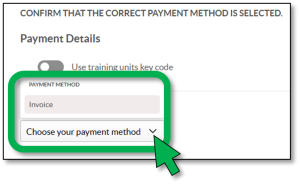
Be sure to select the correct payment method!
-
To use your NCFW funds, enable the “Use training units key code” button under “Payment Details” and enter your Key Code (fiscal year + your M#). See example of the NEW UI below:

-
To bill your University Account (pay out of pocket), do NOT enable the “Use training units key code” button and select “Invoice” from the “Choose your payment method” dropdown list.
-
-
Before you submit, double-check that everything is correct (especially your payment method).
For full step-by-step instructions and screenshots, refer to How do I purchase training.pdf.
To register for courses in My Learning Connection:
MyMissouriState > Learning and Development Card > My Learning Connection.
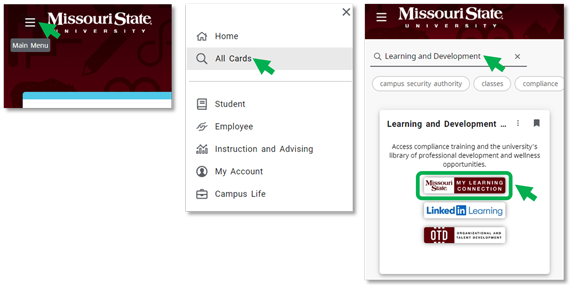
Then search for the course, view details, and request to be registered.
Please contact HRLearning@missouristate.edu with questions.
Discover more from Human Resources Blog
Subscribe to get the latest posts sent to your email.