
Missouri State University

Skip to content Skip to navigation
a b c d e f g h i j k l m n o p q r s t u v w x y z

Procurement Services Blog

  • Procurement Services

Optimizing Campus Travel: Missouri State University Southwest Business Account

October 2, 2026 by Isaac Balasundaram

Whether heading to a national conference, taking students on a field trip, or traveling for research, booking university travel should be simple and cost-effective. Missouri State University provides direct access to dedicated corporate travel benefits through the Missouri State Southwest Business Account.

Key Benefits
β€’ Simplified Booking: Easily manage itineraries and track flights through a single central portal.

β€’ Flexible Policies: Take advantage of Southwest benefits, including no change fees and two free checked bags (subject to weight and size limits).

β€’ Rewards & Credits: Keep track of corporate travel credits and rewards points applied toward university travel.

Fast-Track A-List Status
Enroll in current corporate promotional offers to gain trial A-List status (enjoying priority boarding, free checked bags, and priority security). Maintain the status for 12 months by completing 3 round trips (or 6 one-way flights) within the promotional window.

How to Get Started
1. Visit the Missouri State Southwest Business Account Page.
2. Review Procurement Card and Financial Services travel guidelines.
3. Check for current corporate promotions to enroll in promotional A-List status before booking.
4. Access the SWABIZ Booking Portal to log into the corporate portal and complete your booking.

Questions or Issues?
Contact Isaac Balasundaram at isaacbalasundaram@missouristate.eduor call 417-836-4670.

Filed Under: Procurement Services Tagged With: Airlines, Financial Services, Procurement Card, Procurement Services, Southwest Airlines, Travel

Amazon Business-Medical Supplies Curated Catalog

October 1, 2026 by Isaac Balasundaram

Exciting News: Amazon Business Partnership – By migrating our Medical Supplies category spend to Amazon Business using the Medical Supplies Curated Catalog, Missouri State University will achieve potential cost savings of 15%.

Items with a Green Checkmark βœ… are Missouri State University Preferred items and will receive discounted pricing under the Curated Catalog Program!!!

πŸ”₯ Key Benefits of Your Medical Supplies Curated Catalog:

  • Access to 1k+ highly-rated medical supply items
  • All items maintain 4.5+ star ratings
  • Pre-negotiated competitive pricing on medical essentials
  • Guaranteed stock availability
  • 6-month price ceiling protection
  • Average savings up to 15% on medical supplies
  • High in-stock rates for reliable inventory
  • Business Prime shipping options

πŸ”₯ Key Product Categories:

  • Exam Gloves & Hand Protection
  • First Aid Supplies & Kits
  • Personal Protective Equipment (PPE)
  • Wound Care & Bandages
  • Diagnostic Equipment & Instruments
  • Lab Supplies & Consumables
  • Sanitization & Disinfectants
  • Medical Instruments & Tools
  • Patient Care & Mobility Aids
  • Respiratory Supplies

πŸ’° CQE (Custom Quote Engine) β€” Even Greater Savings:

Need pricing beyond the catalog? Missouri State University can leverage the Custom Quote Engine (CQE) for additional savings on high-volume or specialty medical items:

  • Request custom quotes on any medical supply item β€” even those outside the curated catalog
  • Ideal for large departmental orders or recurring supply needs
  • Receive competitive bids tailored to Missouri State’s specific volume requirements
  • Quotes are typically returned within 1–2 business days
  • Lock in pricing for extended periods on high-volume items
  • No minimum order requirements to request a quote

How to request a CQE quote: Simply add items to your cart and select “Request a Quote” at checkout to receive customized pricing.

πŸ“¦ Bulk Buy Discounts β€” Save More When You Buy More:

Take advantage of tiered bulk buy pricing for additional savings on frequently ordered medical supplies:

  • Automatic quantity discounts applied at checkout when ordering 8+ units
  • Tiered pricing β€” the more you order, the greater the discount
  • Savings of up to 15% off catalog price on bulk medical supply orders
  • Perfect for department-wide orders of gloves, PPE, sanitizers, and consumables
  • Discounts stack with Curated Catalog pricing for maximum savings
  • No need to request a separate quote β€” bulk pricing displays automatically on eligible items

πŸ’‘ Pro Tip: Combine Curated Catalog pricing + Bulk Buy discounts + CQE quotes to maximize your savings! Departments ordering high-volume consumables like exam gloves or disinfectants can see combined savings of 30%+.

πŸ”₯ How to Access the Medical Supplies Curated Catalog:

We’ve made it easy to access the catalog. It can be found anytime via the link under your main navigation menu or by searching for your product directly. Look for the green checkmark βœ… to identify preferred items with discounted pricing.

  • Log into your Amazon Business account at business.amazon.com
  • Navigate to the Curated Catalog link in your main menu
  • Browse or search for medical supplies
  • Look for the green checkmark βœ… for preferred/discounted items
  • For high-volume needs, use “Request a Quote” (CQE) at checkout

Questions or Issues?
Contact Isaac Balasundaram at isaacbalasundaram@missouristate.eduor call 417-836-4670.

Filed Under: Procurement Services, Uncategorized Tagged With: Amzon Business, Bulk ordering, Medical Supplies

New Procedure: IT Equipment Purchase Requests and Approvals

October 1, 2026 by Isaac Balasundaram

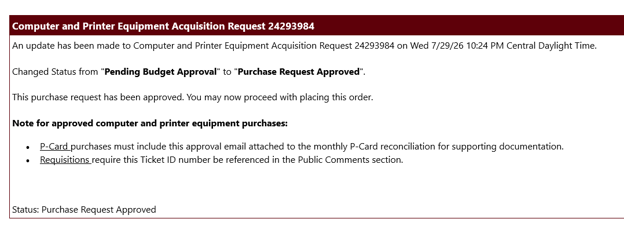
Before purchasing covered computer, printer, or peripheral equipment:

  1. Submit an IT Equipment Purchase Request through the Computer & Printer Equipment card in My.MissouriState.edu. The request needs to be submitted before making the purchase.
  2. Include the IT approval with either your P-Card documentation or requisition/payment request submission.

Items that require IT Equipment Purchase Request Form:

This requirement applies to all brands and vendors.

  • Computer equipment: laptops, desktop towers, all-in-one computers, monitors, laptop docks, and tablets, including iPads and Android tablets
  • Printers and scanners: desktop printers, multifunction printer/copiers, and document scanners
  • Peripheral equipment: external hard drives, UPS units, and surge protectors

Items that do not require IT Equipment Purchase Request Form:

  • Keyboards and mice
  • Headsets
  • Toner and printer supplies
  • Power cords and cables
  • USB flash drives
  • Privacy screens
  • Webcams and microphones

Filed Under: Information Services, Procurement Card, Procurement Services Tagged With: Hardware, Information Services, IT Purchasing, P-Card, Payment Request, Procurement Card, Procurement Services, Requisition

New Procedure: Foreign Vendor Screening

September 28, 2026 by Isaac Balasundaram

Departments must screen foreign vendors before completing a transaction, regardless of payment method. Screening helps identify potential restricted-party or sanctions concerns.

How to screen a foreign vendor
1. Open the Consolidated Screening List

Use the U.S. Department of Commerce, International Trade Administration (ITA) Consolidated Screening List (CSL) Search Engine.

Also review these lists, which are not included in the CSL:

Section 1260H list
Section 1286 list

2. Search the vendor

Enter the vendor’s legal business name in the search field. You may leave the address blank. If you have the exact name, you may leave Fuzzy Name turned off. Do not select specific sources or countries.

3. Review the results

No potential match: The department may proceed with the transaction.
Potential match: Do not proceed. Contact Research Administration for review before continuing.

4. Keep screening documentation

Save evidence of the screening with the transaction records. A screenshot or other electronic record of the search results is acceptable. Documentation should show:

The vendor name searched
The date of the search
The search results

Include the screening documentation with the supporting records for requisitions, payment requests, and travel expense reimbursements. For P-Card transactions, upload the documentation to the UMB Bank system.

5. Screen for every transaction

Screening is required for each transaction involving a foreign vendor. A previous search cannot be reused; complete a new CSL search and retain new supporting documentation for every transaction.

Filed Under: Financial Services, Procurement Services, Research Administration Tagged With: Foreign purchases, Foreign vendors, P-Card, Procurement Card, Procurement Services, Research Administration

Procurement Card: Food and Foreign Purchases

September 28, 2026 by Isaac Balasundaram

Food Purchases

  • Cardholders do not need to submit the Food Hosting Form before an event if they submitted one on or after January 1, 2026.
  • Include the form with the P-Card documentation; do not send it to Procurement Services.
  • The P-Card Food Policy applies only to restaurant and catering purchases, not food supplies.
  • A list of attendees is required for all applicable food purchases.

Foreign Purchases

  • Cardholders do not need to submit a new request to pay a foreign vendor before purchasing if they submitted one on or after January 1, 2026.
  • A P-Card exception is not required if the card is already authorized for foreign transactions.

Filed Under: Procurement Services, Uncategorized Tagged With: Food, Foreign purchases, P-Card, Procurement Card, Procurement Services

Categories

  • Financial Services
  • Information Services
  • Procurement Card
  • Procurement Services
  • Research Administration
  • Uncategorized

Archives

  • October 2026
  • September 2026

Meta

  • Log in
  • Entries feed
  • Comments feed
  • WordPress.org
  • Accessibility
  • Disclaimer
  • Disclosures
  • Equal Opportunity Employer and Institution
  • © 2026 Board of Governors, Missouri State University
  • Contact Information