
The new Transfer Credit Reevaluation and Preapproval (TCRP) system will be rolled out to users based on their roles:
- Request Approvers: December 2, 2024
- Advisors: December 16, 2024
- Students: January 13, 2025
While the new TCRP system will be available early in the Spring 2025 semester, with early access for approvers, the legacy transfer system (TCRP 1.0) will remain available until the end of the Spring 2025 semester. As links to the new TCRP system are posted, existing links will be marked “Legacy” to indicate the original system.
Here are some highlights of the improvements made in TCRP 2.0:
- ADA Compliance
- Attaching syllabi to requests
- Receiving email notifications upon approval or denial
- Design enhancements
- Streamlined request forms
- Advisor submission on behalf of a student
- Faster overall process
- Increased search options for approvers
Review the comprehensive Transfer Credit Re-Evaluation & Preapproval (TCRP) System guide for detailed instructions for students, advisors, and approvers.
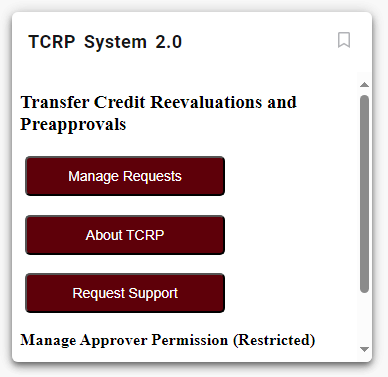
Request Approvers, such as Department Heads, will have access to the new system starting December 2nd. Look for the TCRP System 2.0 card in My Missouri State.
Advisors will gain access on December 16th and will need to navigate through the Student Information Menu found on the Faculty & Advisor Resources card in My Missouri State.

Students will be able to access the forms via the Transfer Resources card starting January 13th.

If you encounter any issues, please report them using the TCRP Support page found under Custom & Vendor Software Support (MIS) in the IT Service Portal.

ⓘ It’s often helpful to include a screenshot when reporting issues, and they can be attached directly to your support ticket.
Learn how to take a screenshot using the following guides: How to Take Screenshots on Windows 11 and Take a screenshot on your Mac.