
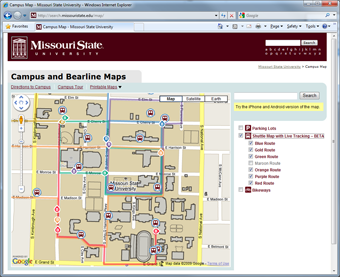
 The Missouri State University Campus Map combines several different types of data into a single map site using the Google Maps API version 2. This past June, my office was approached by Jeffrey Thomas, a senior computer science student at the university, about software he had developed that uses BlackBerry phones as GPS devices. Jeffrey wanted to track in real time the location of buses in our campus transit system. As we looked at use cases, it didn’t take long for us to realize a large demand for such a service was going to be from the person standing at a bus stop with a mobile phone as opposed to the more traditional user on a laptop or desktop.
Version 3 API Issues
I began working on a proof of concept of such a site using the newly announced Google Maps API Version 3 but ended up having to postpone the project due to lack of features – especially polylines. After polylines were added, the first major snag I hit was lack of support for tile layers. So I wrote my own. I spent several days hammering out the code, followed by a substantial amount of time beyond that optimizing.
On our main map, we had been using invisible polygons to make our buildings clickable. I knew that strategy wasn’t going to perform well on a mobile device, so I changed to using an AJAX call that dynamically queried our database. The strategy worked so well we ended up implementing it on our main map as well. I’m even in the process of implementing the clickable tile layers that Pamela Fox described in her presentation at Google I/O on our main map.
Once these issues were handled, the major hurdles became less technical and more user-interface focused. I wasn’t happy with just having our bus routes and bus locations displayed on the map – I wanted a mobile map with the majority of the features offered on our main map.
Interacting on a Small Screen
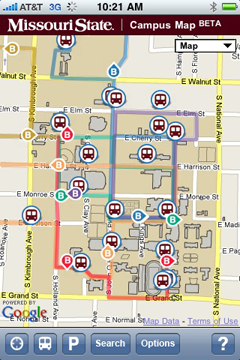 I struggled for a while with how to create an interface that maximized the actual map size but supported three different overlays (one with sub-options), geolocation and search. With feedback from coworkers, I ended up taking a cue from the default map application on the iPhone; I added a 44 pixel action bar to the bottom of the screen and used a combination of icons and text labels. Informal user testing has shown this approach to be effective as even people not familiar with either the iPhone or our campus have been able to effectively use the map.
Branding and the Fine Print
With screen real estate a precious commodity, I knew any type of header to the page was going to have to be small. Yet it was crucial to display our university logo and the page title. I settled on a thin band at the top. It was also a requirement to have some standard fine print on the page – typically reserved for the footer. I was not willing to shrink the map any more to accommodate such text. so I ended up developing an “about” button on my bottom toolbar which brought up an overlay with all of the required information.
Optimizing Everything
Once development was nearing completion, I moved to spending a considerable amount of time on improving performance. I took full advantage of the version 3 API support for marker icons using CSS sprites. I ended up also using CSS sprites for the action bar icons.
Fortunately, the Google Closure Compiler was just released. In order to use it for JavaScript minimization and optimization, I took the time to annotate my JavaScript (which was no small task).
The Allure of the Native App
Having our map site available in various app stores would provide exposure and better usability; however, I’m not willing to maintain additional versions of the map. That only really leaves me with the option of writing a shell application that simply embeds a browser (which may still happen). Now that the map has been optimized, the performance of the web application is very close to that of the native maps application on the iPhone.
Discover more from Web Strategy and Development News
Subscribe to get the latest posts sent to your email.