

Whether you’re new to Excel or a seasoned user seeking a refresher, our Microsoft Excel Series of workshops offer valuable skill boosts. However, we understand that it’s sometimes hard to attend a scheduled workshop.
That’s why we have curated three Microsoft Excel Learning Paths on LinkedIn Learning to allow you to enhance your Excel skills anytime! The content is delivered in easily digestible segments, allowing you to progress at your preferred pace. Your progress is preserved, enabling you to revisit previous topics as necessary for maximum retention.
Choose Your Learning Path Today:
 |
 |
 |
- Microsoft Excel Level 1 Learning Path
- Getting Started with Excel
- Formatting
- Managing Data
- Helpful Tips!
- Microsoft Excel Level 2 Learning Path
- Chart Essentials
- Basic PivotTable Concepts
- Building Your First PivotTables
- Microsoft Excel Level 3 Learning Path
- Data Validation
- Conditional Formatting
- Formulas and Functions
Demonstrate your commitment to professional growth by enrolling in a Microsoft Excel Learning Path. Utilizing LinkedIn Learning is free; activate your license and start today!
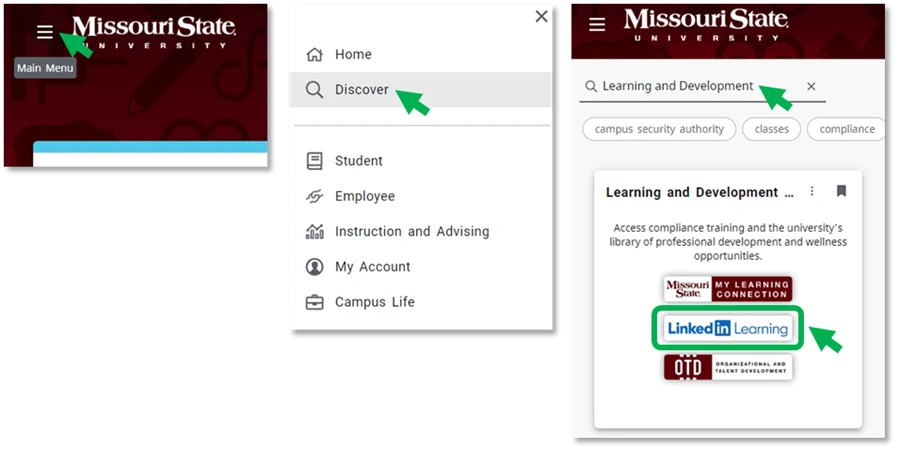
How to Access LinkedIn Learning:
- Log in to the My Missouri State portal.
- Locate the Learning and Development card.
- Click on the Main Menu icon.
- Click Discover to search.
- Search for ’Learning and Development’
- Click on the LinkedIn Learning link.
Note: If accessing LinkedIn Learning for the first time, you will have the option to “Connect my LinkedIn account” or “Continue without LinkedIn“. Please see the How to Access LinkedIn Learning (Faculty/Staff) Knowledge Base article for more information.

 Happy learning from your friends at Organizational and Talent Development!
Discover more from Human Resources Blog
Subscribe to get the latest posts sent to your email.