Missouri State University

Skip to content Skip to navigation
a b c d e f g h i j k l m n o p q r s t u v w x y z

Information Services Notifications and Outages

Be the first to know about system upgrades, outage notifications, and more from Information Services.

  • Information Services
  • Computer Services Help Desk

Banner Outage Tonight (Fri 14 Aug 2026) at 6pm!

August 14, 2026 by Brian Edmond

Tonight (Friday 14 August 2026), we need to apply a quick security patch to our Banner environment. We plan to start at 6pm and expect less than an hour of total outage time. Due to the nature of the outage, some systems might remain available if you are using them at the time. This is not a comprehensive outage.

The following systems could be impacted during the outage:

  • My Missouri State
  • Admin Banner
  • Argos, including Bear Intelligence
  • Banner Document Management (BDM)
  • Self-service 9, including Employee Profile, Student Profile, Registration, and Faculty Assignments
  • Custom web applications (Grails and Django), including Who-What, ATLAS, and Class Dashboard
  • Any other system that relies on a direct connection to Banner

The following systems will not be impacted:

  • University networks
  • Phone systems
  • Main (public) websites
  • Brightspace
  • Office 365
  • Email services
  • Video surveillance systems
  • Electronic door access
  • Application for admission

If you have questions, please submit a Help Desk ticket.

Filed Under: Springfield Tagged With: Banner, BDM, downtime, ERP, maintenance, Outage

ZOOM Licenses

August 13, 2026 by Steve Coffman

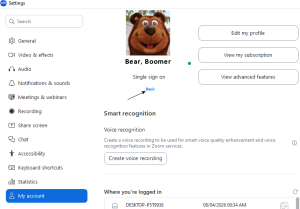
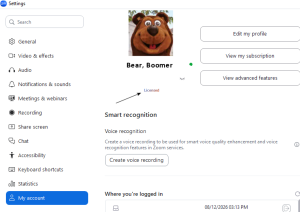
HOW TO CHECK IF I HAVE A PRO LICENSE? (MEETINGS LONGER THAN 40 MIN)

Login to your account on zoom. Under settings, look at “My Account”

If you see “Basic” under your account you are only licensed for 40 min. If you see “licensed” you are setup with a pro license and can run meetings for as long as needed. If you need a pro license email the Telecommunications mailbox at telecommunications@missouristate.edu.

NOTE: If you account gets changed from a “Basic” to a “Pro Version” make sure you log out and back in.

Basic License

PRO License


Filed Under: Uncategorized, Zoom

BDM Services Restored

August 4, 2026 by Lacey Geiger

Thank you all for your patience. The remaining issues with Banner Document Manager (BDM) have been rectified and all document links should now be working as anticipated. If you are still experiencing any trouble, please submit a ticket so we can connect you with the fastest possible assistance.

Zoom accounts

August 3, 2026 by Steve Coffman

Currently we are having an issues accessing the pro licenses of zoom which allows for meetings longer than 40 minutes. We are working with the vendor now to figure out the issue. We will update when we have more info.

*Zoom has granted us access to limited pro licenses. Please contact Telecommunications at telecombilling@MissouriState.edu for temporary access to a pro license. 

UPDATE: Zoom is expected to start the provisioning this morning. If everything goes smoothly we should be back up within 24 hours. 

RESOLVED: Zoom has finished the provisioning. We will be updating the user list and moving licenses this morning. If anyone that had the pro version before doesn’t see their account updated by noon today please reach out to us at telecombilling@MissouriState.edu. Again thanks for everyone’s patience and help on this. 

HOW TO CHECK IF I HAVE A PRO LICENSE? (MEETINGS LONGER THAN 40 MIN)

Login to your account on zoom. Under settings, look at “My Account”

If you see “Basic” under your account you are only licensed for 40 min. If you see “licensed” you are setup with a pro license and can run meetings for as long as needed. If you need a pro license see above to have your account changed.

Basic License

PRO License


Filed Under: Workaround, Zoom

Banner Upgrade Complete!

August 2, 2026 by Brian Edmond

The Banner upgrade is complete and the system has been verified by Information Services personnel and relevant functional areas. If you encounter any issues with Banner or related systems, please use the normal support channels to report it. Thank you to everyone who jumped in to assist with the upgrade!

Tagged With: Banner, downtime, ERP, Outage, Upgrade

« Previous Page
Next Page »

Categories

Archives

Meta

  • Log in
  • Entries feed
  • Comments feed
  • WordPress.org
  • Accessibility
  • Disclaimer
  • Disclosures
  • Equal Opportunity Employer and Institution
  • © 2026 Board of Governors, Missouri State University
  • Contact Information